Introduction
Taskdog is a CLI/TUI task management tool that auto-generates schedules from task deadlines, estimated durations, and priorities — all while respecting a daily work-hour limit.
👉 https://github.com/Kohei-Wada/taskdog
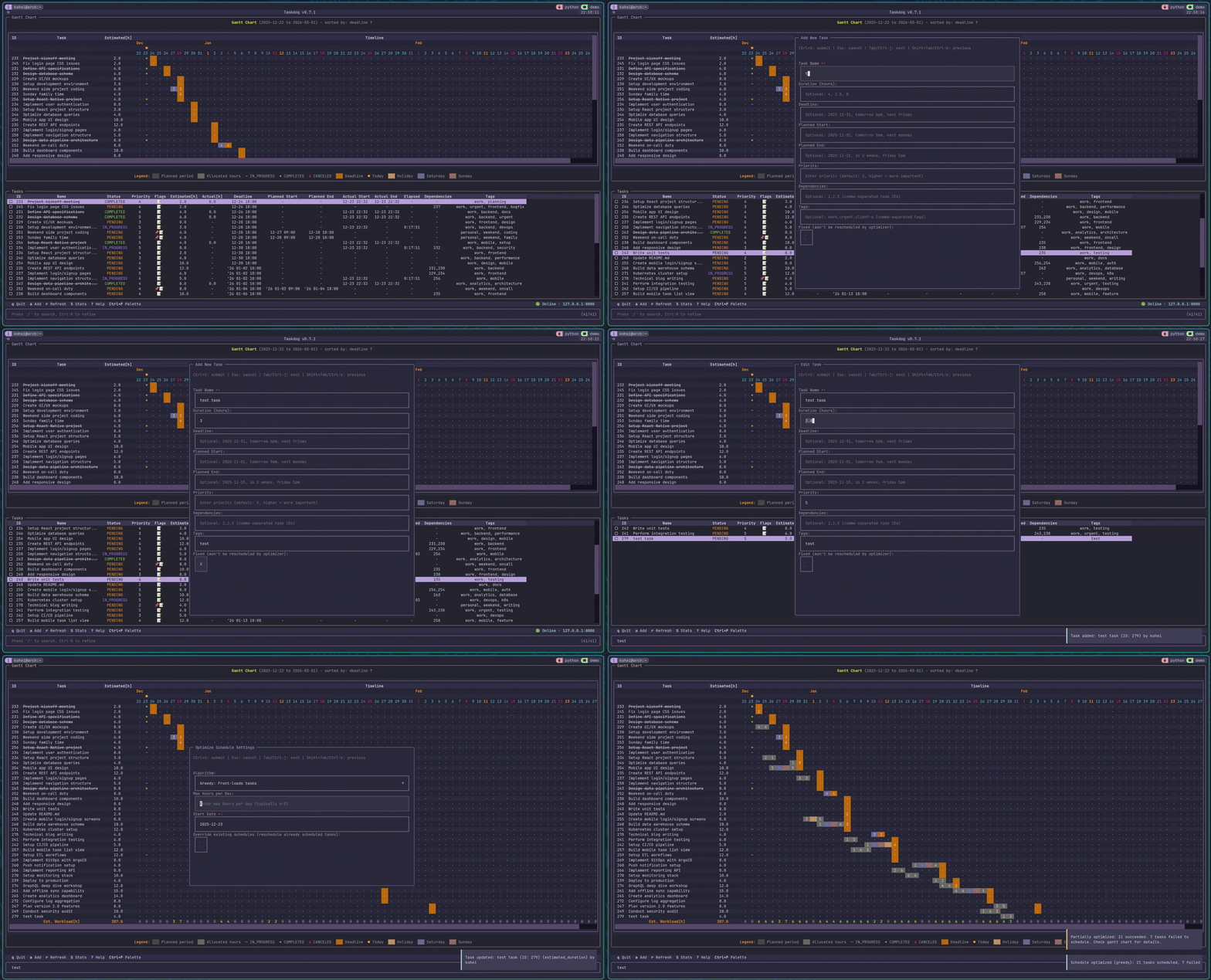
There are mountains of task management tools out there. Todoist, Notion, Trello — all of them are great tools.
But none of them fit my workflow.
So I decided to build my own.
Why I Built It
The Tools I Tried Along the Way
Taskwarrior
The first tool I tried was Taskwarrior.
Taskwarrior is a fantastic CLI task manager. It has over 15 years of history, is simple and fast, and highly customizable. I used it for a while.
But there was one big complaint.
No automatic schedule generation.
You can set a deadline and an estimated duration on a task, but figuring out “OK, so when do I actually do this?” is still up to you. Taskwarrior is great at prioritizing what to do, but scheduling when to do it seems to be out of scope.
Manually deciding “what and how much to do today” every single morning was, frankly, a pain.
Motion / Reclaim.ai
Next I tried AI scheduling services.
Motion and Reclaim.ai are built around the concept of “AI auto-schedules your day.” That certainly sounded convenient.
But a few things bothered me:
- $19–34/month is steep (over $200/year)
- Cloud-required (I don’t want to hand my task data over to a third party)
- Black-box AI (you can’t tell why it picked this schedule)
Even when told “the AI decided,” I felt like I was being handed a schedule I couldn’t really get behind.
Asana / Jira / ClickUp
I also tried team-oriented tools.
They have tons of features, but they’re way too heavy for personal use. Parent-child tasks, subtasks, epics, stories…
One person working solo doesn’t need that kind of complex structure.
Notion
I use Notion for organizing team docs at work. The page hierarchy and database features are excellent.
But it didn’t suit my workflow.
- Heavy — just to add a task I have to open a browser, wait for the page to load…
- Weak task management — you can fake it with databases, but in the end it’s a general-purpose tool
- Automatic scheduling? — nope
What I Actually Wanted
In the end, here’s the kind of tool I wanted:
- Lives entirely in the terminal — opening a GUI is annoying. I want to bang things out on the command line
- Generates the schedule for me — give it priority, deadline, and estimate, and have it tell me “do this today”
- No cloud dependency — privacy first. Data stays local
- Transparent algorithms — not “the AI decided,” but “this logic produced this result” — something explainable
I couldn’t find any existing tool that ticked all those boxes, so I built one.
Comparison with Existing Tools
| Feature | Taskdog | Taskwarrior | Motion/Reclaim |
|---|---|---|---|
| Auto schedule generation | ✅ | ❌ | ✅ |
| Work-hour limit aware | ✅ | ❌ | ✅ |
| Skips weekends/holidays | ✅ | ❌ | ✅ |
| Fully local | ✅ | ✅ | ❌ |
| Transparent algorithms | ✅ | - | ❌ |
| Price | Free | Free | $19–34/mo |
| CLI/TUI | ✅ | ✅ | ❌ |
| Dependencies | ✅ | ✅ | Partial |
Where Taskdog fits: Taskwarrior’s usability + Motion/Reclaim’s automatic scheduling — done fully locally.
What Is Taskdog?
The name is arbitrary. I happened to see Datadog while using Taskwarrior, and went with “Task + dog = Taskdog.” No deeper meaning.
It’s a task management system written in Python, with three interfaces:
- CLI — quick command-line operations
- TUI — full-screen terminal UI
- REST API — programmatic access
Main Features
Basic Task Operations
# Add a tasktaskdog add "READMEを書く" --priority 3 --tag docs
# List tasks (table view)taskdog table
# Start / complete a tasktaskdog start 1taskdog done 1
Schedule Optimization (The Core Feature)
Taskdog’s core feature is auto-scheduling that never exceeds your daily work-hour limit.
If you add a 10-hour task with a deadline three days out, it automatically spreads the work across those three days. Weekends and holidays are skipped automatically, so the schedule it produces is actually realistic.
# A 10-hour task with a 3-day deadlinetaskdog add "レポート作成" --estimate 10h --deadline 2025-01-05
# Run the optimizertaskdog optimize# → Distributes across weekdays only, capped at 6 hours/day (default is configurable)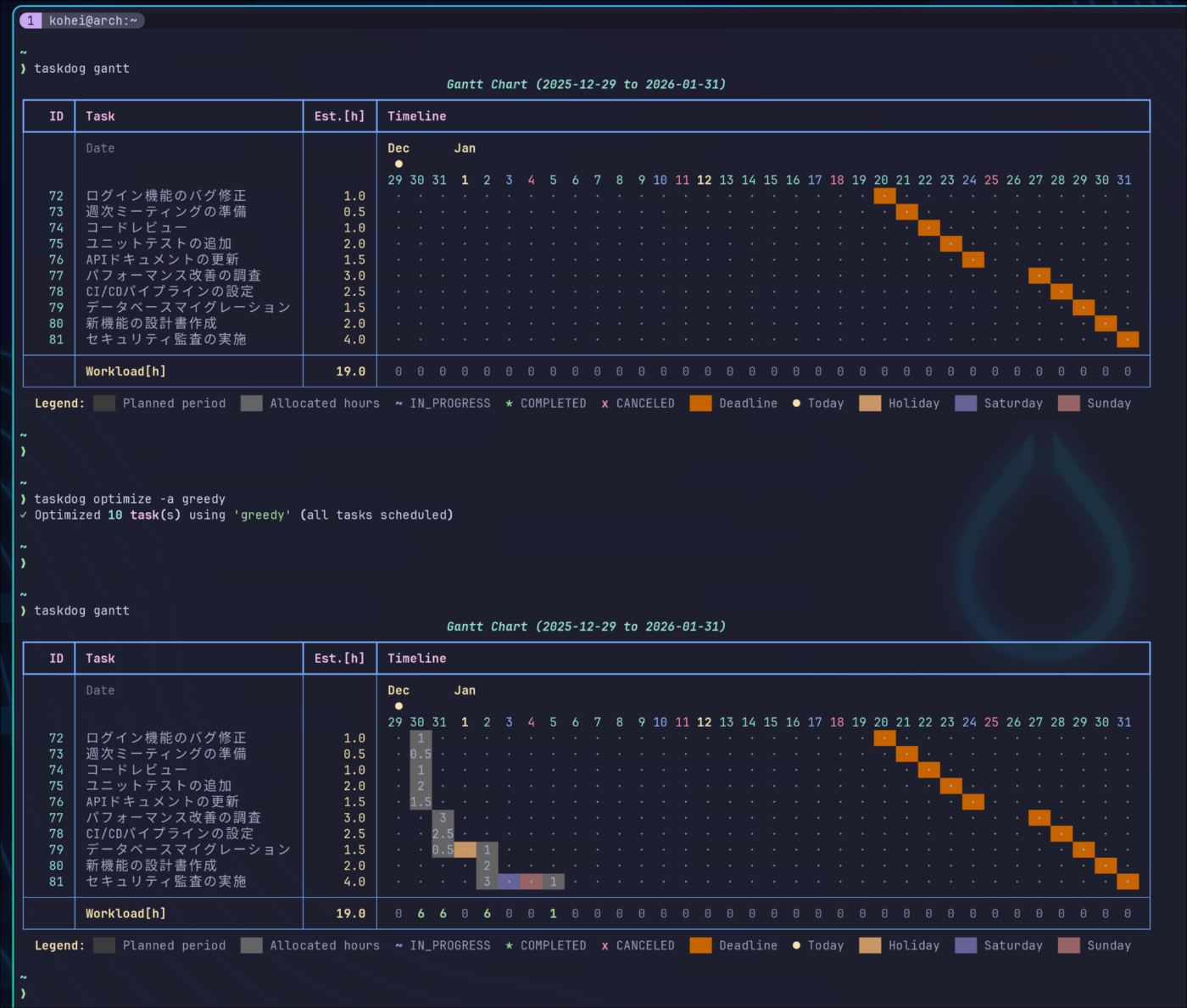
It builds a schedule that respects priorities, deadlines, and dependencies — and stays within your work-hour cap.
Three practical algorithms:
taskdog optimize # greedy (default)taskdog optimize --algorithm backward # deadline-driventaskdog optimize --algorithm dependency_aware # dependency-aware| Algorithm | Description | When to use |
|---|---|---|
| greedy | Schedule everything as early as possible | When you want it done sooner |
| backward | Work backward from deadlines (JIT) | Deadline-driven work |
| dependency_aware | Critical Path Method (CPM) | When dependencies are heavy |
These are the three I actually use day to day.
Experimental algorithms for learning (six of them):
I’ve also implemented balanced, priority_first, earliest_deadline, round_robin, genetic, and monte_carlo. These were built as experiments. See the repo for details.
Difference from Motion/Reclaim:
- Motion/Reclaim: black-box AI (you don’t know why this schedule)
- Taskdog: transparent algorithms (source-readable, swappable)
Gantt Chart View
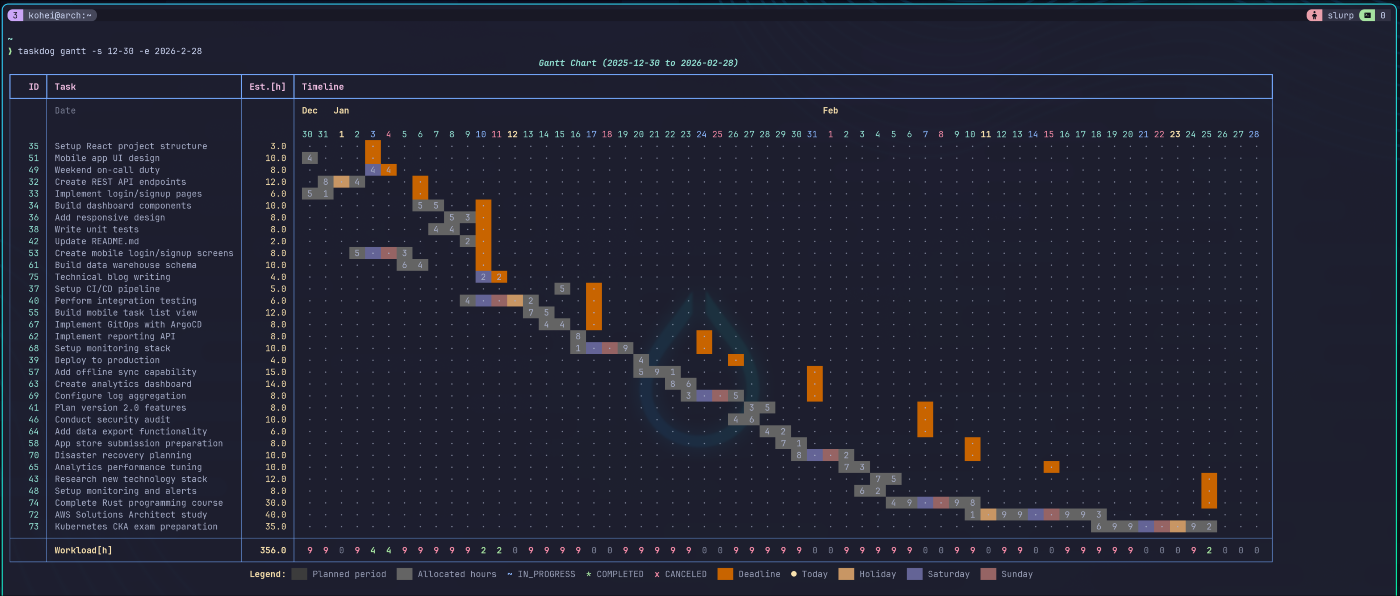
taskdog ganttYou get a Gantt chart right in the terminal. It also shows the daily load, so you can spot “this day is overpacked” at a glance.
TUI (Full-Screen Mode)
taskdog tuiThe look and feel lean toward Vim/Neovim.
Real-time task search with / is modeled after telescope.nvim, so Neovim users should feel right at home.
| Key | Action |
|---|---|
a | Add task |
s | Start |
d | Complete |
/ | Search |
Ctrl+P | Command palette |
? | Show help |
Other Features
- Task dependencies:
taskdog add-dependency 2 1(task 2 starts after task 1 is done) - Fixed tasks: exclude meetings and other immovable events from optimization
- Skip weekends/holidays: only schedule on weekdays (supports Japanese public holidays)
- Markdown notes: attach notes to any task
- Tag management: categorize tasks
- Time tracking: compare planned vs. actual
- MCP support: AI agents can manipulate tasks directly
Tech Stack
| Layer | Library |
|---|---|
| CLI | Click + Rich |
| TUI | Textual |
| API | FastAPI + Uvicorn |
| DB | SQLite + SQLAlchemy + Alembic |
| Type checking | mypy |
| Linter | Ruff |
| Package manager | uv |
Architecture
Built with Clean Architecture, organized as a monorepo via uv workspaces.
packages/├── taskdog-core/ # Business logic (no UI dependencies)├── taskdog-client/ # HTTP API client├── taskdog-server/ # FastAPI REST API├── taskdog-ui/ # CLI/TUI└── taskdog-mcp/ # Claude Desktop integration (MCP)This structure means:
- The UI can be swapped without touching core
- server and ui can be deployed independently
- Tests are easy to write
Design Principles
1. Embrace That It’s Personal
Team features, cloud sync, collaboration — I cut all of it.
Reasons:
- Keeps things simple
- Protects privacy
- The peace of mind of being fully local
2. Transparent Algorithms
Instead of “the AI built your schedule,” it should be possible to say “this algorithm produced this result.”
All three of the practical algorithms (greedy, backward, dependency_aware) are readable in source. If you don’t agree with one, you can tweak it yourself.
3. Following GTD Principles
I borrowed ideas from David Allen’s Getting Things Done:
- Tasks should be concrete actions
- Dependencies should be explicit
- Regular review (
taskdog today,taskdog gantt)
What Was Hard, What I Learned
The Parent-Child Task Feature That Didn’t Work Out
Early on I tried to implement parent/child tasks (subtasks).
I figured “being able to decompose big tasks into smaller ones would be useful.”
But as I dug in, the problems piled up:
- Should the parent task be scheduled? Just the children?
- Is the parent’s estimate the sum of the children? Or independent?
- When all children are done, does the parent auto-complete?
- When you delete the parent, what happens to the children?
The fit with the optimization algorithms was particularly awful. Every optimizer needed special-case logic for parent/child relationships, and the code kept growing more tangled.
In the end I scrapped parent-child tasks and replaced them with dependencies + tags + notes.
I realized I’m only juggling a handful of tasks at a time — there’s no need to organize them in a tree.
Migrating to Clean Architecture
I started with a simple structure, but as features grew the code got messy. (At the very beginning it was literally just a pile of commands editing a JSON file.)
Partway through I migrated to Clean Architecture. That was a lot of work:
- Separating domain, application, and infrastructure layers
- Aligning the direction of dependencies
- Introducing the Use Case pattern
But the payoff was worth it:
- All three interfaces — CLI, TUI, API — run on the same business logic
- Tests are easy to write
- Adding new features got much easier
What’s Next
- 24-hour task execution
- Recurring tasks
- Improving the scheduling algorithms
For details, see DESIGN_PHILOSOPHY.md.
Closing Thoughts
Building your own task manager for yourself might be one of the privileges of being a programmer.
Taskdog is still under development and probably has bugs and rough edges. Even so, it fits my workflow perfectly.
I think it’s particularly suited to:
- People using Taskwarrior who wish it auto-generated schedules
- People interested in Motion or Reclaim but unwilling to pay $20/month
- People who want their task data to stay local
- People who want a schedule built by transparent logic, not “because the AI said so”
If any of that sounds like you, give it a try. Stars, issues, and PRs are all welcome.